Below you find all known bug reports concerning StarOffice 4 Kids including a short description and a solution to the problem. In case you have a bug announcement that is not described here, please, send an email with a description of the problem to
so4k-support@kippdata.de.
Bug Reports
The installation does not start.
Description:
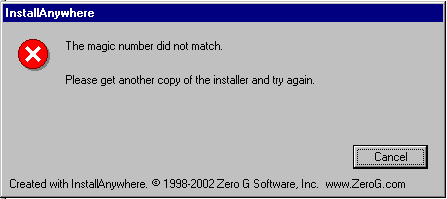
When you double-click on the so4k installation file, that you have downloaded from the internet, you get a report from InstallAnywhere saying you don't have a "matching magic number". It then tells you, that you should get another copy of the installation program and launch it.
Solution:
Your download failed. You should get a new download of StarOffice 4 Kids at
so4k.kippdata.com.
The installation has been cancelled. (Applies to Linux and Solaris)
Description:
You tried to start the installation of StarOffice 4 Kids in a text terminal (shell). It is cancelled producing the following bug report “NoClassDefFoundError”. The full report reads as follows:
Preparing to install...
Extracting the JRE from the installer archive...
Unpacking the JRE...
Extracting the installation resources from the installer archive...
Configuring the installer for this system's environment...
Launching installer...
Invocation of this Java Application has caused an
InvocationTargetException. This application will now exit. (LAX)
Stack Trace:
java.lang.NoClassDefFoundError
at java.lang.Class.forName0(Native Method)
at java.lang.Class.forName(Class.java:140)
at
java.awt.GraphicsEnvironment.getLocalGraphicsEnvironment(GraphicsEnvironment.java:62)
at java.awt.Window.init(Window.java:223)
at java.awt.Window.(Window.java:267)
at java.awt.Frame.(Frame.java:398)
at java.awt.Frame.(Frame.java:363)
at com.zerog.ia.installer.Main.c(Unknown Source)
at com.zerog.ia.installer.Main.main(Unknown Source)
at sun.reflect.NativeMethodAccessorImpl.invoke0(Native Method)
at
sun.reflect.NativeMethodAccessorImpl.invoke(NativeMethodAccessorImpl.java:39)
at
sun.reflect.DelegatingMethodAccessorImpl.invoke(DelegatingMethodAccessorImpl.java:25)
at java.lang.reflect.Method.invoke(Method.java:324)
at com.zerog.lax.LAX.launch(Unknown Source)
at com.zerog.lax.LAX.main(Unknown Source)
Solution:
You have tried to run the installation on a system, that does not provide a graphical terminal. You do need a graphical terminal for the installation of StarOffice 4 Kids, because the user guidance only works in a window.
The teachers workplace doesn’t start. You cannot load a document to the students workplace. (Applies to Windows NT and Windows 2000)
Description:
Your installation of StarOffice 4 Kids has been finished successfully, but you cannot use the teacher’s workplace and the students workplace. While starting the teacher’s workplace it is cancelled producing a bug report. You can start the students workplace, but if you try to load a document it is cancelled.
Solution:
Presumably you still have an older version of StarOffice on your system and its quick starter was still active while installing StarOffice 4 Kids. Is that the case, please, deinstall StarOffice 4 Kids, close the quick starter using your task manager (the process is called soffice) and once again install StarOffice 4 Kids.
The teachers workplace doesn’t start. You cannot load a document to the students workplace. (Applies to Linux)
Description:
Your installation of StarOffice 4 Kids has been finished successfully, but you cannot use the teacher’s and students workplace. While starting the teacher’s workplace it is cancelled producing a bug report. You can start the students workplace, but if you try to load a document it is cancelled. The StarOffice bug report says, that the component-manager is not available.
Solution:
In this case the StarOffice installation has been implemented under a Windows file system (FAT 32) and it doesn’t work properly under Linux. Is that the case, please, deinstall StarOffice 4 Kids, and install it once again. For the new installation, please, make sure that your target directory of your StarOffice installation is located on a Linux file system.